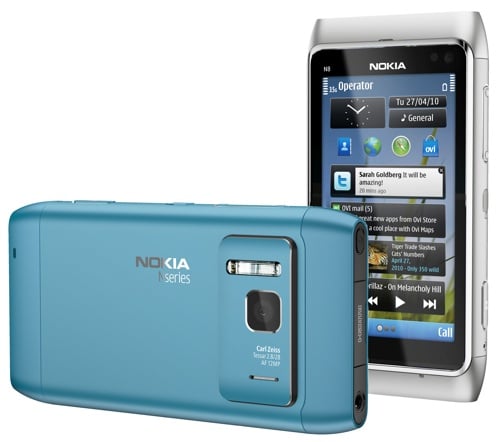
How often do you see somebody in town with a high-end Nokia phone these days? Is there even such a thing? Nokia's flagships have gone missing, of late, along with half the fleet.
Well, all that should change come early autumn, as Nokia starts to fight back against the pummelling it's been taking from Apple and RIM over the past three years. This time it has some decent ammunition in the form of the N8, a smart camera phone set at an aggressive price.
After six weeks of teasing, the Finns at last offered a hands-on with this in Singapore today - so far journalists have been able to touch one but not turn it on - and I attended a mirror event in London. It worked out at over half an hour's facetime with the prototype - not enough to explore all its features, or put all the claims to the test, but enough to get a decent overall impression.
First impressions
After envisaging the smartphone market 15 years ago, Nokia was badly caught out by competitors who timed their arrival to perfection (Apple) or brought a good reputation in a niche market to the mass market (RIM). It wasn't the lack of QWERTY or a touchscreen that embarrassed Nokia, but the reality that the competition offered a much more straightforward and less niggly user experience. S60 had been considered "good enough" for years, but really it was neglected, and the pigeons finally came home to roost.
This year's Nokia phones will, of necessity, prolong the agony a little longer. There's no sign that its Linux OS (now called Meego) is anywhere ready for prime time, and the major overhaul of Symbian, Symbian^4, won't be in phones until next year. The UI improvements here are incremental, and intended to resolve the greatest niggles, rather than an entirely new shell, or a ground-up rethink, a la Windows Mobile 7.
With the N8, Nokia is fighting back on two fronts, and putting an aggressive price of &370; on the package. It's a cameraphone first, second and third, and features an HDMI port and Dolby Digital Plus surround stereo. This is a subtle but overlooked point - Nokia envisages people hooking the N8 up to the family flat panel TV as often as they hook it up to the PC. Given that new TVs have HDMI ports to spare, this is no longer Jetsons territory.
If the N8 does nothing else (and of course it does), it does photos and video extremely well. This will be the selling point on the high street, and from my hands-on, users shouldn't be disappointed.
Photos are vivid, with plenty of detail, without looking over-processed. There's no more lag with the 12MP images than what people already expect from a phone, which is a huge improvement on some of its predecessors. Half a second should be typical.
Nokia also boasts that the N8 features the largest sensor (1/1.83) of any imaging phone; the lens has a focal length of 28mm. For people who regularly like to blind their friends in dark rooms, the N8 has a "real", ie Xenon flash. In an interview, the Nokia manager responsible said the designers traded off variable aperture for superior optics. Some familiar features from dedicated cameras, such as face tracking, have found their way into the N8.
Nokia has opted not to protect the lens with a mechanical cover, but instead use multicoated scratch-resistant glass. Since almost everyone has had a bad experience of unprotected lenses, the market may take some convincing.
I found the camera slightly less than intuitive, even though it supports more gestures. I couldn't get pinch to zoom to work until it was demonstrated to me. A doubletap produces a fast zoom. But other gestures brought up the traditional slider - which feels quite anachronistic on a "direct manipulation" device.
One aspect likely to stump even more people is the refusal of the main camera button to take a picture - one is available on screen, but for the camera button to become "active", the phone needs to be satisfied it's in focus.
Video performance is also excellent, with audio noise reduction evident, and the phone working hard to eliminate pixel blurring. The spec is 720p video at 25fps, using H.264 encoding. In practice, a thirty second clip turns out a 40 to 45MB file. And you'll want subjects of the video to remain roughly where they are: it doesn't have continuous autofocus.
Obviously the £200-£300 camcorder market will remain intact, but device owners with this kind of capability in their pockets - it's really quite decent - will find themselves making more videos.
There's still some work to be done, I was told, in various aspects of the software - the phone is out in early September (Q3 is the official launch window) - but it already looks an attractive piece of kit.
Build quality
The N8 sacrifices a removable battery and for the first time I can think of in a Nokia product, it's sealed into the phone. But in a nice concession to us tinkerers, you can undo two screws (the only two on the case, as far as I can tell), pop off the end, and replace the battery yourself. Or at least you can on these pre-production models. I hope this design survives the transition to production, because it's the ideal compromise - you don't need to queue for an hour in the basement of Carphone Warehouse just to resolve a battery problem, just find someone with a small screwdriver set. Which we've all got already, right?
Overall the build quality of the N8 terrific. I thought Sony Ericsson, until it lost the plot, was the master of making cheap phones look expensive. This isn't a cheap phone and doesn't feel like any compromises have been made - like the first generation iPhone, it's glass and metal. Unlike other Nokias, the quality of the buttons matches the quality of the chassis. It's a fairly substantial device, but at 135g a shade lighter than the competition.
There's only one button on the face of the phone, Nokia having dispensed with the send and receive call buttons.
What about the rest of the user experience, particularly the notorious S60 UI?
A smooth experience
There's no great leap forward in this, the first Symbian^3, phone - that's still on the drawing board. But then there's no great compatibility headache for developers either - most S60 5th Edition software should work here. S^3 is touted as "a direct manipulation UI", in the manner of the iPhone. But what this really means in practice, I discovered, is that a lot of niggles and inconsistencies have been ironed out.
At its worst, with 5th Edition, you could start an application without ever seeing the launch icon - which I think is unprecedented in computer history, even going back to command-line mainframes. For example, if you double-tapped an icon that turned out to be a folder (and the distinction isn't clear thanks to Nokia's new Esperanto icons), then that action also launched whatever app happened to be in default position in that folder. Only you'd never see what it was. Scary.
The most immediate improvement is performance. Menus open smoothly and without delay. Nokia has dispensed with the too-slow transitions; transitions are there, but are actually so subtle you don't notice them. And the N8 doesn't break sweat when the phone is flipped through 90 degrees, even when this entails some reordering of the screen elements from portrait to landscape.
The only lags I encountered when stress-testing the N8 were switching between the two biggest applications on the device: the new video editor app and Maps. But even then, the worst I got was about a second or so of black screen. The old single/double tap confusion seems to have been comprehensively banished.
Scrolling through albums - a direct steal of Apple's CoverFlow feature - was instant, but the demo phone only had a few dozen albums (and a dozen contacts). Scrolling through photos was also pretty smooth - although when it encountered videos, it gave me a low-res default icon, rather than an image preview of the clip. This is all good, and will be very welcome.
It may be a stretch to call it a "direct manipulation UI", however - there are still controls such as the zoom slider (mentioned above) and scrollbars. You don't need scrollbars if it's a true direct manipulation UI, you just swipe. I can't understand why they're there.
Nokia makes much of a "long press" popping up more context-sensitive menu (Opera's browser makes good use of this) - and it's a nice idea. But it only works in a few places. One place it doesn't is in the S60 applications deck. iPhone users are used to using a long press to delete applications, or move them around, but you can't do either from the Nokia apps list.
And with some trepidation I have to report that the home screen shows little improvement over the N97 from a year ago. It still invites you to clutter it with dodgy widgets.
The sprawl can be extended over three pages of "home" screen, which is probably one more than most people need; I find Android's choice of multiple pages on the home screen pretty pointless and nerdy. Who has more than two homes? Surely it stops being a "home" screen if there are multiple locations - and remember, the old S60 application "deck" is still underneath. But it's all in the name of choice.
Nokia claims to have reduced the number of prompts with which the phone pesters the user - and made setup easier. I couldn't test the latter - it still seems to offer the same, quite daunting "Connectivity" settings of current 5th Edition phones such as the X6.
It's disappointing is that in Symbian^3, Nokia and Symbian haven't grasped the opportunity to make the Settings coherent: they're still atomised, and all over the shop. This was pretty bad in 2002, when the first S60 phone appeared, but it's quite inexcusable now.
Even seasoned Nokia users still have trouble changing the wallpaper or a ringtone on today's phones. Wallpaper isn't under Display, for example. Ugly they may be, but nobody has trouble changing the setting they need with a BlackBerry, while Sony Ericssons remain a model of organisation.
Yet, as I pointed out at the outset, Symbian^3 is a stopgap, and it's removed many of the worst niggles that curse its current offerings.
The verdict
Half an hour isn't a lot of time to put a phone through its paces. The press material for the phone makes much of "web tv" offerings - but these aren't ready yet. Practical users may want to see how quickly it can compress the giant images and clips it takes down to a size suitable for dispatch to a friend or social networking site.
Obviously I couldn't test reception (a question mark whenever a Faraday cage material like aluminium is used) or how well the screen performs outdoors. These are all potential showstoppers.
Nokia's current touchscreens are sort of, meh, alright. They're quite usable if you adjust your expectations accordingly. But with the N8 there are plenty of positives, not least that it shows Nokia can once again bring high quality consumer electronics to a mass market.
The N8 leaves the iPhone unchallenged in terms of usability and apps, but it may well hit the sweet spot for people on a £30-£35, who utterly refuse to pay the Apple tax. It appears that Android phones have that section of the market to themselves. Not for much longer.